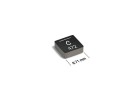
The Interlight 24V 2W BA9S bulb (SKU: 2PAK:WW-27C9-5) is a common bayonet-style indicator lamp used in industrial panels, automotive dashboards, and control systems. While generally reliable, field failures are often traced to a few predictable root causes. The most frequent failure mode is an open filament, which typically results from inrush current spikes or mechanical vibration. The 2W rating at 24V implies a nominal current of about 83mA and a hot resistance of roughly 288 ohms, but the cold filament resistance can be as low as 20 ohms. This tenfold difference creates a massive inrush current at power-on, which can weaken the filament over time. Another common failure is intermittent contact, where the BA9S base does not mate securely with the socket, often due to oxidation or the socket’s contact fingers losing their spring tension. Less common but notable is a short circuit, which usually indicates catastrophic failure from overvoltage or a manufacturing defect in the glass envelope.
To debug a non-working circuit, follow a step-by-step methodology. Start with a visual inspection: look for any blackening inside the glass, a broken filament, or a loose base. Next, measure the bulb’s resistance with a digital multimeter (DMM). An open bulb will read infinite resistance. A good bulb should read between 20 and 30 ohms at room temperature. If the bulb checks out, move to the socket. Measure the voltage at the socket terminals with the bulb removed. You should see 24V DC or AC, depending on your system. If voltage is present and the bulb is good, the problem is a poor connection between the bulb base and the socket. Clean the contacts with isopropyl alcohol and check for corrosion or bent fingers. If voltage is absent, trace back through the wiring: check fuses, switches, and the power supply. Use a DMM in continuity mode to verify each conductor in the path. A clamp meter is helpful for measuring actual current draw; a 2W bulb should draw around 83mA. Significantly lower current suggests a high-resistance connection or a failing bulb.
Common schematic and PCB layout mistakes often involve the remote placement of the bulb from its driver or power source. Long wire runs to a BA9S socket can introduce voltage drop, especially if the wire gauge is too thin (e.g., 26 AWG for a 1-meter run). This can cause the bulb to run at 20V instead of 24V, resulting in a dim, orange glow and reduced lifespan. On a PCB, placing the bulb’s driving transistor or regulator too far away from a local bypass capacitor is a mistake. The inrush current can cause a voltage sag on the 24V rail, potentially resetting nearby microcontrollers. Always place a 100µF electrolytic capacitor near the socket connection. Another layout error is routing the bulb’s return current path through a sensitive analog ground plane, injecting noise. Use a dedicated power ground for the lamp circuit.
Verifying component authenticity and quality is critical, especially with generic parts. The Interlight brand is generally reliable, but counterfeits exist. Genuine Interlight bulbs have a cleanly stamped base with the SKU "2PAK:WW-27C9-5" and a consistent glass envelope. Check the weight; a genuine bulb feels solid. A quick authenticity test is to measure the cold resistance. Counterfeit bulbs often use a thinner, higher-resistance wire to save cost, resulting in a cold resistance of 40 ohms or more, which will make the bulb dimmer. Also, inspect the solder joint where the base meets the glass. A poor, cold-solder joint is a red flag. For quality verification, run the bulb at 26.4V (110% of rated) for 10 minutes. A genuine bulb will glow brightly but not fail. A counterfeit may smoke or blow its filament.
For measurement techniques, a DMM with a low-ohms range (0.1 ohm resolution) is essential for checking contact resistance. Use a thermocouple or thermal camera to spot hot sockets, which indicate high resistance at the connection point. An oscilloscope is invaluable for capturing the inrush current waveform. Place a 1-ohm current sense resistor in series with the bulb and measure the voltage spike at turn-on. A spike exceeding 2V (2A) suggests the power supply is too stiff, and you need a soft-start circuit or an NTC thermistor. For intermittent failures, use a vibration table or simply tap the bulb and socket while monitoring continuity with a DMM set to continuity beep. If the beep cuts out, you have a mechanical intermittent fault.
Suspect the component first if the failure is immediate (open filament on first power-up). Suspect the surrounding circuit if the bulb fails after several hours of operation or exhibits a pattern like always failing at the same time of day (e.g., when a large motor starts). A classic case study involves a customer using this bulb as a pilot light on a 24V AC conveyor control system. They were getting random failures every three weeks. Debugging showed the bulb was receiving 28V AC during the conveyor’s braking cycle due to inductive kickback from the motor contactor. The solution was to add a 24V AC transient voltage suppressor (TVS) diode across the bulb socket. Another case involved a PCB where the BA9S socket was mounted with a metal bracket that was not grounded. Over months, static discharge from an operator’s hand would arc through the glass envelope, creating a pinhole and bulb failure. The fix was to ground the metal bracket to chassis ground. A third case: a customer complained of bulbs failing after only 100 hours. Measurement revealed the cold resistance was 45 ohms, indicating counterfeit bulbs. Replacing with genuine Interlight parts resolved the issue.
In summary, always start with a visual and resistance check on the bulb. Verify socket voltage and contact integrity. Be mindful of inrush current and voltage transients in your circuit design. Use proper wire gauge and local decoupling. When in doubt, compare the cold resistance and weight against a known-good Interlight sample. This practical approach will resolve the vast majority of BA9S-related issues in the field.